

End-to-End Hub-and-Spoke VNet Peering and On-Premises Connectivity Setup.

This guide, Hub-and-Spoke VNet Integration, is an extension of the Site-to-Site VPN from On-Premises to Azure guide.
This guide shows how to configure end-to-end connectivity in a hybrid hub-and-spoke topology using Azure VNets and an on-premises network. It covers adding static address spaces to RRAS server, peering the VPN, Hub, and Spoke VNets, and validating connectivity so that traffic can flow seamlessly between Azure VNets and the on-premises DC1 server.
This guide assumes:
- You have three VNets and one virtual machine in each VNet.
- Azure-to-on-premises S2S VPN connectivity is validated.
You want to add spoke VNets to allow secure communication with on-premises resources via the hub.
Virtual networks:
VNet-ANTUSNET → contains the VPN Gateway and Local Network Gateway with a working Site-to-Site VPN to on-premises.
VNet-ANTUSNET-Hub → main hub for spoke peering (no VPN)
VNet-ANTUSNET-Spoke1 → spoke VNet
Virtual machines:
VM-VPNHub - VNet-ANTUSNET - 10.10.0.0/16
VM-Hub - VNet-ANTUSNET-Hub - 10.20.0.0/16
VM-Spoke1 - VNet-ANTUSNET-Spoke1 - 10.30.0.0/16
Task Details
1. Add static address spaces for the virtual networks VNet-ANTUSNET-Hub and VNet-ANTUSNET-Spoke1 on the RRAS server.
2. Peer the VPN VNet to the Hub VNet.
3. Peer the VPN VNet to the Spoke1 VNet.
4. Peer Hub VNet to Spoke VNet.
5. Validate End-to-End Connectivity.
*
Steps
Add static address spaces for the virtual networks VNet-ANTUSNET-Hub and VNet-ANTUSNET-Spoke1 on the RRAS server.
*
1. On DC1, open Server Manager → go to Tools → select Routing and Remote Access.

*
2. Navigate to IPv4 → Static Routes in RRAS, right-click, and add the static address spaces for all subnets

*

*

*
Peer the VPN VNet to the Hub VNet.
Identify the roles.
The Hub (VNet-ANTUSNET): This VNet contains the Virtual Network Gateway and the S2S VPN connection.
The Spokes (VNet-ANTUSNET-Hub & Spoke1): These VNets will borrow the gateway from the Hub.
To allow your spoke networks to use the VPN connection hosted in VNet-ANTUSNET, you need to configure the peering settings specifically to enable "Gateway Transit." This allows the spokes to "borrow" the site-to-site VPN gateway.
In Azure VNet peering, you are essentially configuring a two-way tunnel. Because peering is not transitive by default, you must explicitly define how traffic behaves for the local network (the one you are currently in) and the remote network (the one you are connecting to).
*
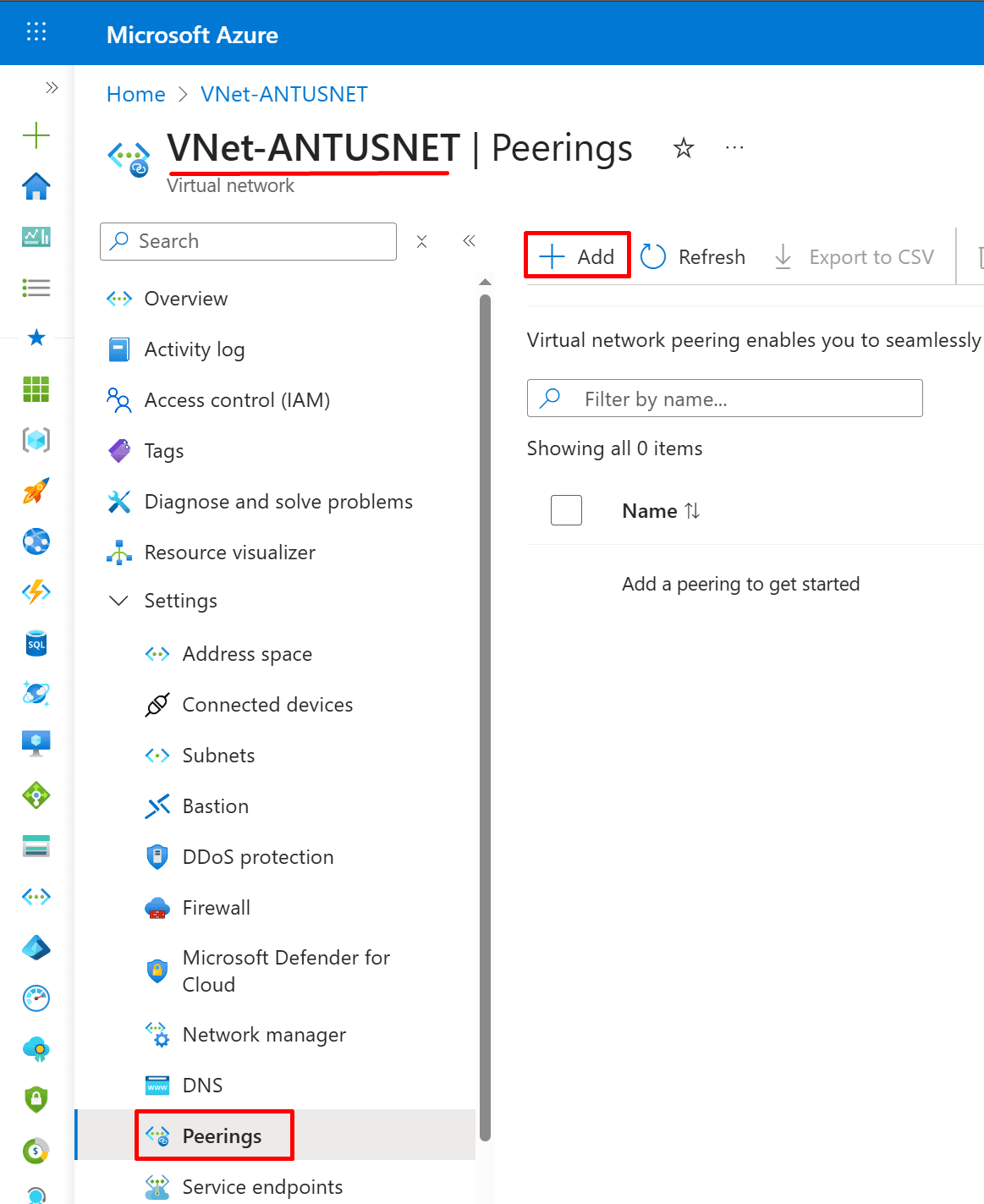
1. Go to the VPN VNet.
- Azure Portal → Virtual Networks → VNet-ANTUSNET
- Click Peerings → + Add
*
2. Choose the following settings (try to understand their purpose).
Note: This screenshot shows configuring VNet peering between a VPN VNet (VNet-ANTUSNET) and a Hub VNet (VNet-ANTUSNET-Hub) with all the required options for traffic forwarding and remote gateway usage, which is necessary for enabling VPN VNet → Hub → Spoke connectivity in a hub-and-spoke topology.

*
Peer VPN VNet to Spoke1 VNet.
1. Go to the VPN VNet.
- Azure Portal → Virtual Networks → VNet-ANTUSNET
- Click Peerings → + Add
- Choose the following settings (try to understand their purpose).
To allow your spoke networks to use the VPN connection hosted in VNet-ANTUSNET, you need to configure the peering settings specifically to enable "Gateway Transit." This allows the spokes to "borrow" the site-to-site VPN gateway.
Note: Here we do the same configuration as with VPN VNet to Hub VNet.
*
Peer Hub VNet to Spoke VNet.
1. Go to the Hub VNet
- Azure Portal → Virtual Networks → VNet-ANTUSNET-Hub
- Click Peerings → + Add
- Choose the following settings (try to understand their purpose).

*
Validate End-to-End Connectivity.
Run the following PowerShell script on virtual machines to allow incoming ping (ICMP) requests.
New-NetFirewallRule -Name "Allow-ICMPv4-Inbound" -DisplayName "Allow ICMPv4 Inbound" -Protocol ICMPv4 -IcmpType 8 -Direction Inbound -Action Allow
Ping on-premises DC1 (192.168.0.100) from VM on VNet-ANTUSNET vnet
Ping other VMs in the peered networks.

*
Ping on-premises DC1 (192.168.0.100) from VM on VNet-ANTUSNET-hub VNet.
Ping other VMs in the peered networks.

*
Ping on-premises DC1 (192.168.0.100) from VM on VNet-ANTUSNET-spoke1 VNet.

*
Conclusion:
By adding static address spaces and configuring VNet peering between the VPN, Hub, and Spoke1 VNets, end-to-end connectivity is established. This allows traffic to flow from the VPN VNet → Hub VNet → Spoke1 VNet and to the on-premises DC1, enabling full communication across the hybrid hub-and-spoke topology.
Written by Kirill.A - Azure & Cybersecurity Consultant at AntusNet